Environment
Situation
This technical note explains how to map the Backspace key on your PC keyboard to function as expected on the host computer. The default mapping for the Backspace key depends upon the version of Reflection X you are running.
By default, the Backspace key functions as a backspace and Shift+Backspace is a delete. However, different X clients interpret the Backspace and Delete keys differently, which may cause unexpected results. For example, the hpterm client normally responds to a Delete key with a backspace, rather than a delete.
Note: For information on mapping the backspace key for Red Hat Linux hosts, see KB 7021673.
Resolution
The backspace key behavior can be permanently or temporarily modified.
Permanently Changing the Backspace Key Behavior
To permanently change the behavior of the Backspace key, follow these steps.
- In the Reflection X Manager, click Settings > Keyboard.
- Select the appropriate "Backspace key sends" option for your host, either Backspace, Delete, or Control-h.
For further details, click Help in the Keyboard Settings dialog box.
- Click OK.
Temporarily Changing the Backspace Key Behavior
If you do not want to permanently map the Backspace key in Reflection X, there are two ways you can temporarily map it. The first method maps the Backspace key in the current window and all subsequent windows. The second method maps the Backspace key in all windows you open using a defined client (.rxc) file.
Mapping the Backspace Key in the Current and Subsequent Windows
If you are running an X client application that expects one Backspace key definition and a text terminal emulator client (such as xterm or hpterm) that uses another, you can use stty to redefine what keysym the client uses for the Backspace key--without affecting other X client applications.
To do this, at the command prompt enter:
stty erase <backspace>Replace <backspace> with an alphanumeric (non-control) character representation in quotation marks:
- Enter "^H" for Backspace
- Enter "^?" for Delete
Note: This command does not work on all hosts. For more information on stty, see the man pages on your UNIX host.
Mapping the Backspace Key for a Client (.rxc) File
When you use a client (.rxc) file to open an xterm, you can enter a -tm option (or ttyModes X Toolkit resource) on the client file's command line to change the Backspace key behavior in all windows opened using that client file.
When you enter the -tm option on the client file's command line, you override the default terminal settings without having to enter a stty command each time an xterm is started. For an example, see Figure 1 below.
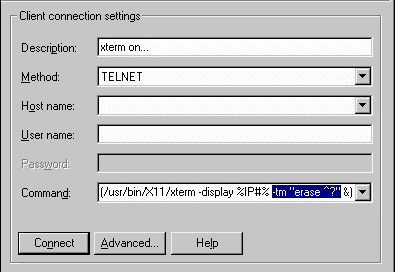
Figure 1: Reflection X Manager window with -tm command line option
For more information on xterm, see your host's man pages.