Environment
Reflection X version 14.x
Situation
When using Reflection X 14.x or Reflection X Advantage to connect to a host over Secure Shell, users may be unable to make a connection if their host password has expired. This technical note explains how to use the Keyboard Interactive authentication method and Password Aging Management (PAM) to resolve this issue.
Resolution
Password Aging Management and Reflection
To change a user's password the host typically requires an interactive shell. Although Reflection X does not provide an interactive shell, this requirement can be bypassed by configuring Reflection X for keyboard interactive authentication user authentication, and configuring the host for Password Aging Management (PAM).
Configure Reflection X 14.x or Reflection X Advantage to use Keyboard Interactive Authentication
Keyboard Interactive user authentication is automatically enabled in Reflection X 14.x or Reflection X Advantage; however, it is not the primary authentication method. Depending on how the SSH server is configured, you may need to move the keyboard Interactive user authentication option to the top of the authentication methods list.
Reflection X Advantage
Follow these steps to modify the authentication order in Reflection X Advantage.
- In the Reflection X Manager, configure your X client to connect with Secure Shell.
- Click Advanced.
- Click the Authentication tab.
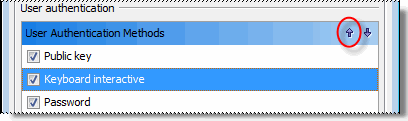
- Under User Authentication Methods, select Keyboard Interactive, and click the "up" arrow to move Keyboard Interactive to the top of the list.
- Click Close. The changes are saved automatically.
Reflection X 14.x
Follow these steps to modify the authentication order in Reflection X 14.x.
- In the Reflection X Manager, select your Secure Shell client connection file.
- Click Advanced.
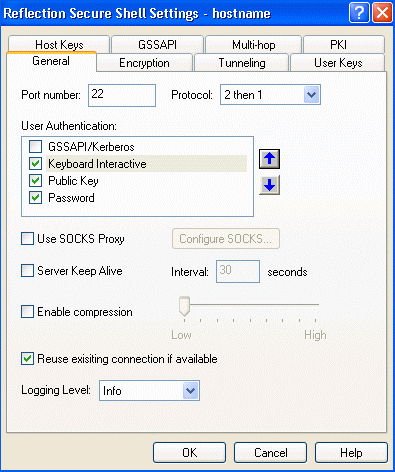
- Select Keyboard Interactive, and click the "up" arrow to move Keyboard Interactive to the list.
- Click OK.
- Click File > Save to save the setting.
Configure the SSH Server to use Keyboard Interactive Authentication
Follow these steps to enable the host's Password Aging Management to interact with Reflection X 14.x or Reflection X Advantage when connecting over Secure Shell. This configuration enables users to update an expired password while connecting to the host using Reflection X 14.x or Reflection X Advantage.
Note: These steps vary based on the SSH server product and version.
Example 1
The following example is for Reflection for Secure IT UNIX Server version 7.0.
- Connect to your host with an account that has permissions to edit the sshd2_config file.
- Open the sshd2_config file in a text editor.
- In the sshd2_config file, ensure that keyboard interactive authentication is enabled, and that PAM is required when using keyboard interactive.
AllowedAuthentications keyboard-interactive AuthKbdInt.Required pam- Save the file.
- Stop and restart the sshd2_config daemon.
Example 2
This example is for OpenSSH UNIX Server v4.3p2.
- Connect to your host with an account that has permissions to edit the sshd_config file.
- Open the sshd_config file in a text editor.
- Ensure the following two settings are enabled:
ChallengeResponseAuthentication yesUsePAM yes- Save the file.
- Stop and restart the sshd_config daemon.
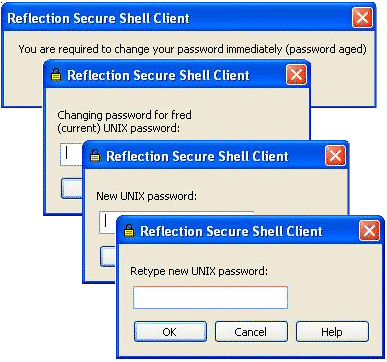
Once these edits have been made to the configuration file, and the daemon is restarted, users will be prompted to create a new password if their password is expired. They will be guided through creating a new password by a series of dialog boxes, similar to the ones below.