Environment
Reflection for IBM 2014
Reflection for UNIX and OpenVMS 2014
Reflection for IBM 2011
Reflection for UNIX and OpenVMS 2011
Reflection Standard Suite 2011
Situation
This technical note lists legacy file types supported by Reflection 2014 and Reflection 2011. These include files created using legacy Reflection products (version 14.x and earlier), EXTRA!, KEA!, and several third party products.
Note: For Reflection Desktop products, see KB 7021411 instead.
Resolution
Enabling Support for Legacy Files
Enabling support for legacy files depends on your product and previous installations.
Reflection 2014
All legacy Reflection and EXTRA! compatibility features are enabled by default in Reflection 2014.
Support for using legacy KEA! files is available starting with Reflection 2014. This feature is available on the Attachmate installation program "Feature Selection" tab, under UNIX and OpenVMS > Compatibility.
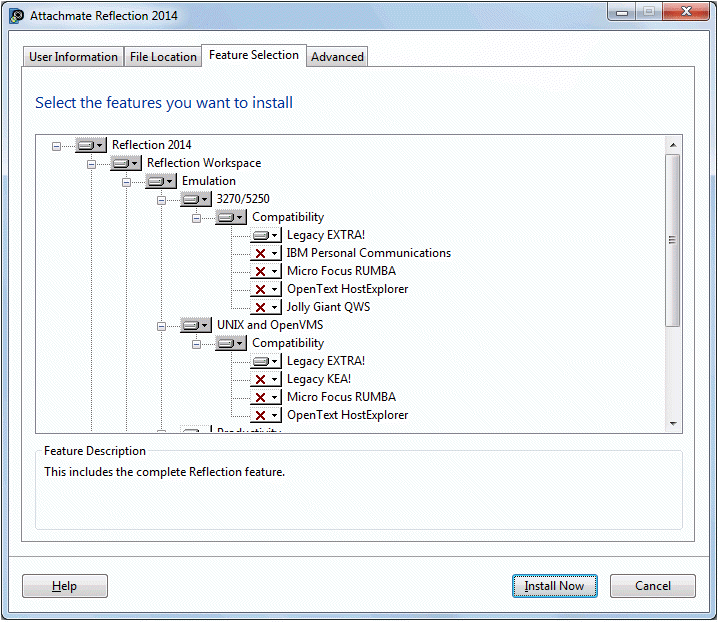
Figure 1: Reflection 2014 feature selection.
Reflection 2011
Legacy Reflection Compatibility features are enabled by default in Reflection 2011.
If you are installing Reflection 2011 on a machine that has EXTRA! or was previously upgraded from EXTRA! to Reflection, the Legacy EXTRA! Compatibility features are enabled by default.
If you are installing Reflection 2011 on a machine that does not have EXTRA! and you want to use EXTRA! files, you must select "Legacy EXTRA!" when you install Reflection. This feature is available on the Attachmate installation program "Feature Selection" tab, under 3270/5250 > Compatibility or UNIX and OpenVMS > Compatibility.
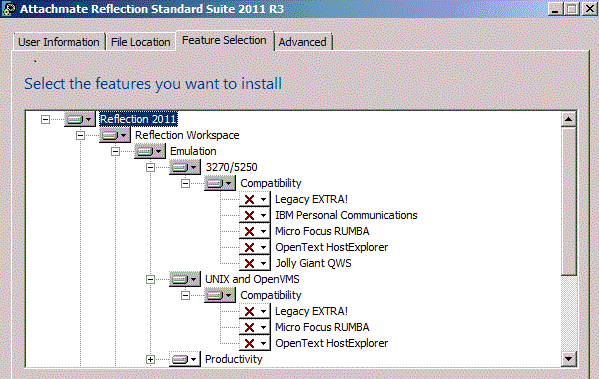
Supported Reflection Legacy Files
The following Reflection legacy files are supported:
| |
|
Reflection 2014 |
Reflection 2011 |
| .r2w |
Reflection for UNIX and OpenVMS Settings File |
yes |
yes |
| .r3w |
Reflection for Secure IT Settings File |
yes |
yes (R3) |
| .r4w |
Reflection for REGIS Graphics Settings File |
yes |
yes |
| .rsf |
Reflection for IBM Settings |
yes |
yes |
| .rvx |
VBA Macro File |
yes |
yes |
| .rfw |
FTP Settings File |
yes |
yes |
| .mto |
Mainframe Transfer Request File |
yes |
yes |
| .xto |
AS/400 Transfer Request File |
yes |
yes |
| .rcl |
Reflection Command Language Scripting File |
yes |
yes |
| .rbs |
Reflection Basic Scripting Files |
yes |
yes |
| .rma |
Reflection Macro File |
yes |
yes |
Supported EXTRA! Legacy Files
| |
|
Reflection 2014 |
Reflection 2011 |
| .eqp |
EXTRA! QuickPads (read only) |
yes |
yes |
| .etb |
EXTRA! Toolbars (read only) |
yes |
yes |
| .edp |
Display Session |
yes |
yes |
| .ekm |
EXTRA! Keyboard Map |
yes (.ekm files can now be browsed for in the keyboard map file picker) |
yes |
| .eil |
EXTRA! File Transfer Schemes |
yes |
yes (R1 SP1) |
| .elf |
EXTRA! Layout Files * |
yes |
yes |
| .ebm |
EXTRA! Basic Macros |
yes |
yes |
| .ebh |
EXTRA! Basic Header |
yes |
yes |
* EXTRA! layout files are one type of EXTRA! macro. To run EXTRA! layout files in Reflection you must create a file association with the .elf file extension. Follow these steps:
- Copy your .edp and .elf files to \Documents\Attachmate\Reflection.
- Double-click an .elf file in the \Documents\Attachmate\Reflection folder.
- Windows will prompt you for a file association.
- Browse to the Reflection install directory and select ebrun.exe.
- Select the check box to always use this program to open this type of file.
Supported KEA! Legacy Files
The following KEA! file type is supported.
| |
|
Reflection 2014 |
Reflection 2011 |
| .ktc |
KEA! configuration file |
yes |
no |
Supported Third Party Product Files
You can run a majority of macros created by the following products. The macros run directly without conversion.
| |
|
Reflection 2014 |
Reflection 2011 |
| .ebs |
OpenText/Hummingbird HostExplorer - Hummingbird Basic macro |
yes |
yes (R3) |
| .jgs |
Brandon Systems/Jolly Giant QWS 3270 macro |
yes |
yes (R3) |
| .rmc |
Micro Focus Rumba macro |
yes |
yes |
| .mac |
IBM Personal Communications macro |
yes |
yes |
| .vbs |
IBM Personal Communications VBScript |
yes |
no |
For more information about running macros, see https://docs.attachmate.com/reflection/2014/r1/tshelp/en/user-html/macros_run_pr.htm.
All trademarks, trade names, and company names referenced herein are used for identification only and are the property of their respective owners.
Troubleshooting Legacy Files
If you have problems with your legacy files, review the following issues.
Trusted Location
If your EXTRA! .edp files are stored in Program Files\Attachmate\EXTRA! (and not in \My Documents), and you open the .edp files in Reflection , then an error displays: "Unable to open because it is not in a trusted location." To resolve this error, add the .edp file location (path) to Reflection's Trusted Locations (specified in Reflection Workspace Settings).
Custom Configuration File Location
If you open an .edp file that refers to other custom configuration files (for example, a custom keyboard map file), the custom configuration file must be in either:
- The “schemes” subfolder in the “Default legacy EXTRA! directory” (configured in Reflection Workspace Settings), typically My Documents\Attachmate\EXTRA!\schemes, OR
- The same location as the .edp file
If no custom configuration file is found, Reflection will use a default file, and you may think that the EXTRA! custom configuration settings have been lost.
In Reflection 2014, when an .edp session file is opened and a custom keyboard map is found, a new .xkb file is created. To determine if Reflection 2014 or 2011 found the custom keyboard map, open the Manage Keyboard Maps dialog and look at the filename being used (.ekm or .xkb). If Reflection cannot find the keyboard map file, defaults are used.