Environment
Reflection for UNIX and OpenVMS 2014
Reflection for UNIX and OpenVMS 2011
Reflection Standard Suite 2011
Reflection Windows-based Products version 14.x
Reflection for Secure IT Windows Client version 7.x
Situation
Resolution
Enable GSSAPI/Kerberos Authentication
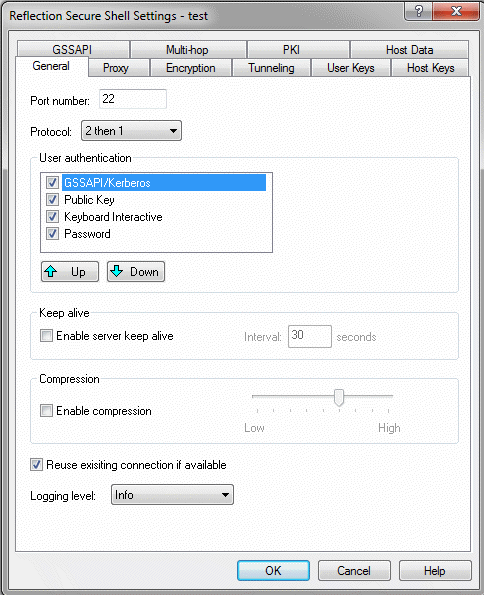
By default, GSSAPI/Kerberos authentication is not enabled in Reflection Secure Shell settings. To enable GSSAPI/Kerberos as a user authentication method,
- Open the Reflection Secure Shell Settings dialog box.
- Click the General tab.
- Select the GSSAPI/Kerberos check box under User authentication.
GSSAPI Tab
Use the GSSAPI tab of the Reflection Secure Shell Settings dialog box to specify settings for GSSAPI/Kerberos authentication.
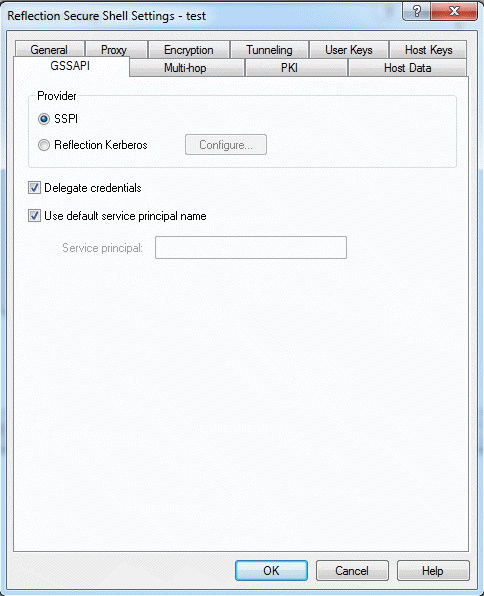
Note: Items on this tab are available only if GSSAPI/Kerberos is selected in the User authentication list on the General tab.
Use the options in the Provider section of the GSSAPI tab to specify whether GSSAPI authentication is handled by the Microsoft Security Support Provider Interface (SSPI) or the Reflection Kerberos client:
SSPI—When SSPI is selected, Reflection uses your Windows domain login credentials to authenticate to the Secure Shell server. You can select this option if you log onto a Microsoft Windows 2008 or 2003 domain. Using this setting simplifies setup; there is no need to configure the Reflection Kerberos client.
Reflection Kerberos—When Reflection Kerberos is selected, Reflection uses the Reflection Kerberos client for Kerberos/GSSAPI authentication. Before you can make connections using the Reflection Kerberos client, you must configure Reflection Kerberos. You can use the Configure button to configure Kerberos if it has not yet been configured on your system, or to modify your existing Kerberos configuration.
Delegate credentials—This setting specifies whether or not GSSAPI forwards your Kerberos ticket granting ticket (TGT) to the host. Ticket forwarding is enabled by default. Clear this setting to disable ticket forwarding.
This setting affects only Secure Shell protocol 2 (ssh2) connections.
Use Default service principal name—The service principal name is the name Reflection uses when it sends a request for a service ticket to the Kerberos Key Distribution Center (KDC). The format is hostname@realm. The hostname value is the name of the Secure Shell server to which you are connecting. The realm value depends on which GSSAPI provider you have selected:
- If you are using Reflection Kerberos, the realm name is specified in your default principal profile.
- If you are using SSPI, the realm name is your Windows domain name.
Use the Service principal setting to specify a non-default service principal name. If you have selected SSPI for your GSSAPI provider, you can use this setting to specify a service principal in a realm that is different from the Windows domain. Use a fully qualified host name followed by @ then the realm name, for example: myhost.myrealm.com@MYREALM.COM.
Additional Information
Legacy KB ID
This document was originally published as Attachmate Technical Note 1938.