Environment
Situation
You may have a port conflict if any of the following symptoms occur:
- When you attempt to run your web project created with VHI Web Builder, you see a 404 file not found error message.
- With version 7.5 or higher, the java.exe process that runs VHI Web Server slowly increases its CPU usage to 100%.
- With version 7.5 or higher, the %VHI_ROOT%/servletengine/logs/server.log file contains the following message:
java.net.BindException: Address already in use: bind- With version 7.1.x or earlier, in the <VHI install path>\tomcat\logs directory, the file catalina_log.<date>.txt contains the text:
Error creating server socket: java.net.BindException: Address already in use- With version 7.1.x or earlier, the VHI Web Server service fails to start. (The operating system shows the service is not started, even though you have attempted to start it.)
- With version 7.1.x or earlier, when you build your web project with VHI Web Builder, you see java.io.FileNotFoundException errors, such as the following sample:
Retrieving model metadata from VHIWriting project description fileGenerating JavaBeans source codeCompiling JavaBeans source codeCreating JavaBeans jar fileBuilding web applicationBuilding web application configurationDeploying web applicationError communicating with app serverjava.io.FileNotFoundException: http://localhost:8081/manager/remove?path=/sewCICSAcctsDemo at sun.net.www.protocol.http.HttpURLConnection.getInputStream( Unknown Source) at com.wrq.vhi.builder.process.TomcatManager.sendCmd(TomcatMan ager.java:429) at com.wrq.vhi.builder.process.TomcatManager.remove(TomcatMana ger.java:245) at com.wrq.vhi.builder.Main.deploy(Main.java:180) at com.wrq.vhi.builder.Main.process(Main.java:123) at com.wrq.vhi.builder.ui.Worker.run(StatusDialog.java:286) at java.lang.Thread.run(Unknown Source)Error communicating with app serverjava.io.FileNotFoundException: http://localhost:8081/manager/install?path=/sewCICSAcctsDemo&war=file:C%3A%5CProgram+Files%5CVHI%5Clib%5Cbuilder%5C..%5C..%5Ctomcat%5Cwebapps%5CsewCICSAcctsDemo at sun.net.www.protocol.http.HttpURLConnection.getInputStream( Unknown Source) at com.wrq.vhi.builder.process.TomcatManager.sendCmd(TomcatMan ager.java:429) at com.wrq.vhi.builder.process.TomcatManager.install(TomcatMan ager.java:239) at com.wrq.vhi.builder.Main.deploy(Main.java:184) at com.wrq.vhi.builder.Main.process(Main.java:123) at com.wrq.vhi.builder.ui.Worker.run(StatusDialog.java:286) at java.lang.Thread.run(Unknown Source)Precompiling JSP'sFinished |
- When you open http://localhost:8081 (or http://<hostname>:8081 if VHI is installed on a different system), you see an unexpected welcome page. You should see a welcome page similar to the following, depending on the VHI version installed:
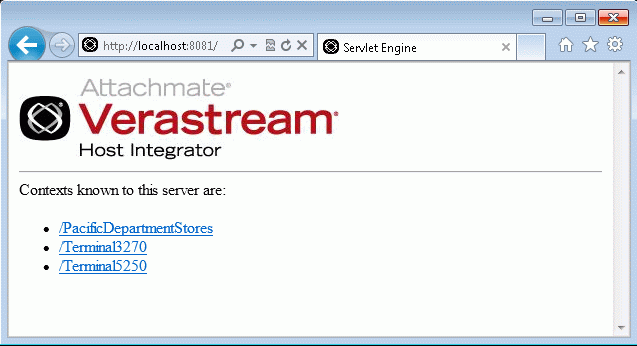
Figure 1—Version 7.5 or higher: VHI Web Server welcome page
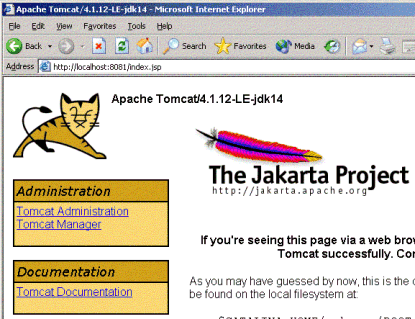
Figure 2—Version 7.1x or earlier: Tomcat welcome page (Tomcat version varies by VHI product version)
Resolution
Use the following steps to change the port(s) used by VHI Web Server different unused port(s). In the steps below, nnnn represents an unused port number. Note: In a Server Kit installation, skip to step 4.
- Open Web Builder's common.properties file in a text editor. The file location varies by product version:
Version 7.1 or higher: %LOCALAPPDATA%\Attachmate\Verastream\HostIntegrator\webbuilder\common
Version 6.0 through 7.0: <VHI install path>\lib\webbuilder\common
- Change the following line to an unused port number:
servletcontainerport=nnnn- If the Web Builder application is running, close and restart it.
- Modify the Web Server's configuration file in a text editor.
Version 7.5 or higher: In the <VHI install path>\servletengine\conf directory, open the container.properties file in a text editor. Modify the following lines to use available port numbers:
servletengine.port=8081servletengine.ssl.port=8443 |
Version 6.0 through 7.1 SP2: In the <VHI install path>\tomcat\conf directory, open the server.xml file in a text editor. Locate the following lines and change the port= value to the unused port number:
<!-- Define a non-SSL Coyote HTTP/1.1 Connector on port 8081 --><Connector port="nnnn" maxThreads="150" minSpareThreads="25" maxSpareThreads="75" enableLookups="false" redirectPort="8443" acceptCount="100" debug="0" connectionTimeout="60000" disableUploadTimeout="true" /> |
- Restart the VHI Web Server.
Version 7.x: On Windows, run Restart Web Server.bat, typically located in C:\Program Files\Attachmate\Verastream\HostIntegrator\bin\services\WebServer. In version 7.5 or higher on UNIX/Linux, run atstart -restart webserver, where atstart is typically located in /opt/attachmate/verastream/hostintegrator/bin.
Version 6.5 and 6.6: Click Start > Programs > Attachmate Verastream > Host Integrator > Services > Web Server > Restart Web Server.
Version 6.0: Click Start > Programs > AttachmateWRQ Verastream > Host Integrator > Services > Web Server > Restart Web Server.
Alternative Solution
An alternative solution is to change the port used by your other software. Refer to the documentation for your third-party software.
Cause
The VHI web server, which runs Java or HTML 5 projects created in Web Builder, is configured to run at TCP port 8081 by default. Beginning in version 7.5, port 8443 is also used for HTTPS.
There can, however, be other software already running at this port. For example, Network Associates' McAfee software (for anti-virus and network security) runs a web server on port 8081 by default for its "Agent Wake-Up Call" service or FrameworkService.exe.
If port 8081 (or 8443) is already in use, the VHI Web Server is not able to start. When attempting to deploy or run a web project, the URL file path is not found in the web server used by the third-party software, resulting in a "file not found" error.